The short answer
- Get the mic close: a lav on the chest or a shotgun just out of frame beats any expensive mic placed far away.
- Fix the room before you fix the mic. Turn off HVAC, kill fridges and fans, and soften hard walls with blankets or furniture.
- Record two sources (for example a lav and a boom), set levels so speech peaks around -12 dB, and wear headphones the entire time.
Viewers forgive soft focus and a slightly off white balance. They do not forgive bad audio. If the voice is echoey, buried in hum or clipping on every laugh, people click away, even when the picture is gorgeous.
The good news is that clean interview sound is mostly technique. Below is the setup we teach new shooters, in the order you should think about it on set.
Start with the room, not the mic
Every microphone records the room it is in. A bare office with glass walls and a tile floor will sound hollow no matter what you plug in. Before you unpack the audio bag, stand where the subject will sit, clap once and listen. A sharp, ringing echo means you need to soften the space.
- Turn off the HVAC for each take, and remember to turn it back on during breaks
- Unplug the fridge, ice machine or vending machine if you can (and put your car keys in the fridge so you cannot leave without plugging it back in)
- Silence phones, smart speakers and computer notifications in the room
- Close doors and windows, and ask about scheduled noise like landscapers or deliveries
- Hang moving blankets or lean couch cushions just out of frame to absorb reflections
- Pick the room with carpet, curtains and soft furniture over the empty one with the nicer view
Record 30 seconds of silence in every location before you start (room tone). Your editor will use it to fill gaps and smooth noise reduction later.
Choose your microphones
For seated interviews you have two main tools, and the best setups use both.
Lavalier (lav) mic
- Clips to the chest, so the distance to the mouth never changes
- Wireless versions let the subject move or stand
- Picks up very little room echo
- Watch for clothing rustle and a visible cable or capsule
Shotgun mic on a boom
- The most natural, open sound when placed close
- Nothing to hide on the subject's body
- Needs a stand or an operator, and must stay out of frame
- Picks up more of the room than a lav does
If you only own one mic, make it a lav. It is forgiving, it travels well and it hides most room problems. Once you have a second source, add a shotgun on a stand above the subject, angled down toward the mouth, just outside the top of the frame. That gives your editor a choice and a safety net.
The on-camera mic is for reference audio only. It helps sync clips in the edit, but it sits too far away to carry the interview.
Place the mic correctly
Distance is everything. Every time you double the distance between mic and mouth, the voice drops and the room gets louder in comparison. That is why a cheap lav close to the subject often beats a pricey shotgun across the room.
- Lav: center of the chest
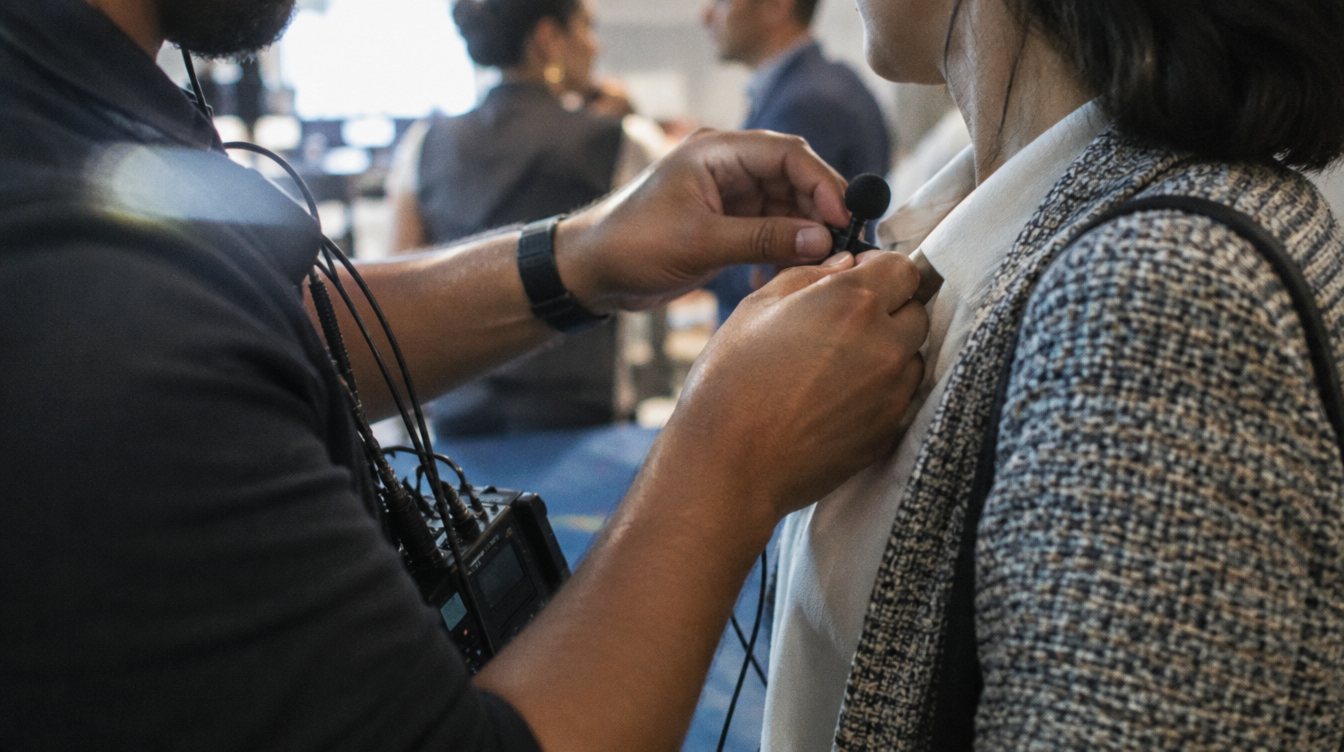
Clip it about a hand's width below the chin, on the sternum. Clip it on the side the subject will turn toward when they talk to the interviewer, so their voice stays on-mic.
- Kill rustle
Keep the capsule away from collars, necklaces, lanyards and ties. If you hide it under clothing, use a dedicated lav mount or tape so fabric cannot rub across the capsule.
- Dress the cable
Make a small loop under the clip (a strain relief loop) and run the cable inside the shirt so a tug does not yank the mic.
- Boom: above and in front
Aim the shotgun at the mouth from above, roughly 1 to 2 feet away, just outside the frame line. Check the monitor at your widest shot so the mic never dips in.
- Test with the real voice
Ask the subject what they had for breakfast and to laugh once. Normal conversation is quieter than people's "test" voice, and laughs are what clip.
Set levels you can trust
Gain staging sounds technical, but the goal is simple: the voice should be loud enough to sit well above the noise, with room to spare for laughs and emphasis.
Set the gain at the source first (the transmitter or recorder input), then match it at the camera. Turn off auto gain on the camera; it pumps the background up during pauses. If your recorder supports a safety track (a second copy recorded lower) or 32-bit float recording, turn it on. Both give you a way back if the subject suddenly shouts.
If you are not wearing headphones, you are not recording audio. You are hoping.
Always record a backup
Wireless systems drop out. Batteries die. Someone bumps a cable. The professional habit is to have every important voice recorded in two places.
| Setup | Primary | Backup |
|---|---|---|
| Solo shooter, one subject | Wireless lav into camera | Internal recording on the transmitter, if it has it |
| Solo shooter, better | Wireless lav into camera | Shotgun on a stand into a second channel |
| Two-person interview | A lav on each person, each on its own channel | A boom or room mic into a separate recorder |
| Podcast or panel | Dedicated mic per person into a recorder or mixer | Camera scratch audio for sync |
Keep channels separate. Two voices mixed onto one track cannot be balanced later if one person is louder.
Monitor the whole time
Use closed-back headphones and listen to the actual recorded signal, not the room. You are listening for four problems: rustle, hum, distant traffic or aircraft, and dropouts. When you hear one, stop politely and redo the line. Subjects rarely mind, and it costs ten seconds instead of an unusable answer.
Also watch the subject's habits. People who talk with their hands often tap the chest where the lav is. People who lean back drift away from the boom. Adjust between questions, not during them.
Practice drills
- The distance test
Record yourself reading the same paragraph with a mic at 6 inches, 2 feet and 6 feet. Listen back on headphones. You will never place a mic lazily again.
- The room test
Record the same paragraph in your kitchen, your bedroom closet and your car. Compare the echo. This trains your ear to judge rooms in seconds.
- The rustle hunt
Clip a lav to three different shirts (a T-shirt, a button-up and a sweater) and move around. Learn which fabrics are noisy and how to tape against them.
- The full rehearsal
Set up a friend with a lav and a boom, run a 10-minute interview, then edit it. Fix every problem you hear in the next round.
Once audio is solid, the next skills are lighting and camera setup. Read how to light an interview with three lights, and when you are ready for gear, our guide to the best lav mics and recorders for interviews. If you are building a podcast, how to start a video podcast covers the multi-mic side. This is the same audio discipline we bring to our own interview and content shoots.
Frequently asked questions
Is a lav or a shotgun mic better for interviews?
For a beginner with one mic, a lav. It stays a fixed distance from the mouth and hides room echo. A shotgun on a boom can sound more natural, but only when it is placed close and the room is quiet. The best setup records both.
Can I fix bad interview audio in post?
Some of it. Noise reduction tools can lower steady hum and hiss, and room tone helps smooth edits. Clipping, heavy echo and dropouts are very hard to repair, so it is always faster to fix them on set.
What levels should I record interview audio at?
Aim for normal speech peaking around -12 dB, with loud moments staying below about -6 dB. Never let it touch 0 dB. If your gear supports a safety track or 32-bit float, use it.
Do I really need headphones?
Yes. Meters show volume, not quality. Only headphones reveal rustle, hum, buzz or a dying wireless signal while you can still fix it.